

 EN
EN
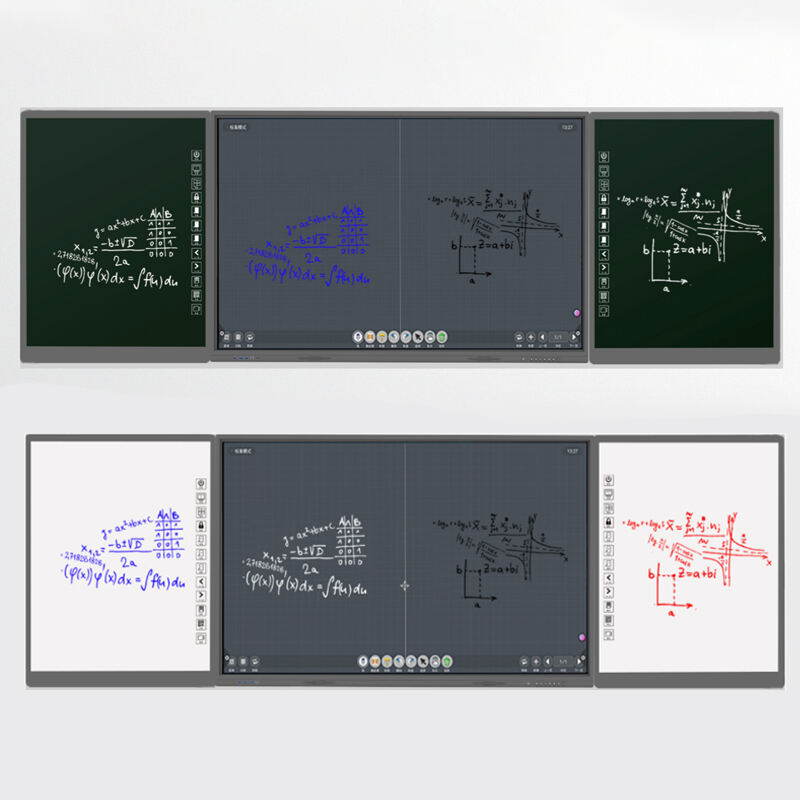
Modern classrooms are experiencing a technological revolution that transforms how educators deliver content and how students absorb knowledge. The interactive blackboard has emerged as a cornerstone technology that bridges traditional teaching methods with cutting-edge digital capabilities. This advanced educational tool represents more than just a digital upgrade from conventional whiteboards, offering immersive learning experiences that engage multiple learning styles simultaneously. Educational institutions worldwide are recognizing the transformative potential of interactive blackboard technology in creating dynamic, collaborative learning environments that prepare students for an increasingly digital future.
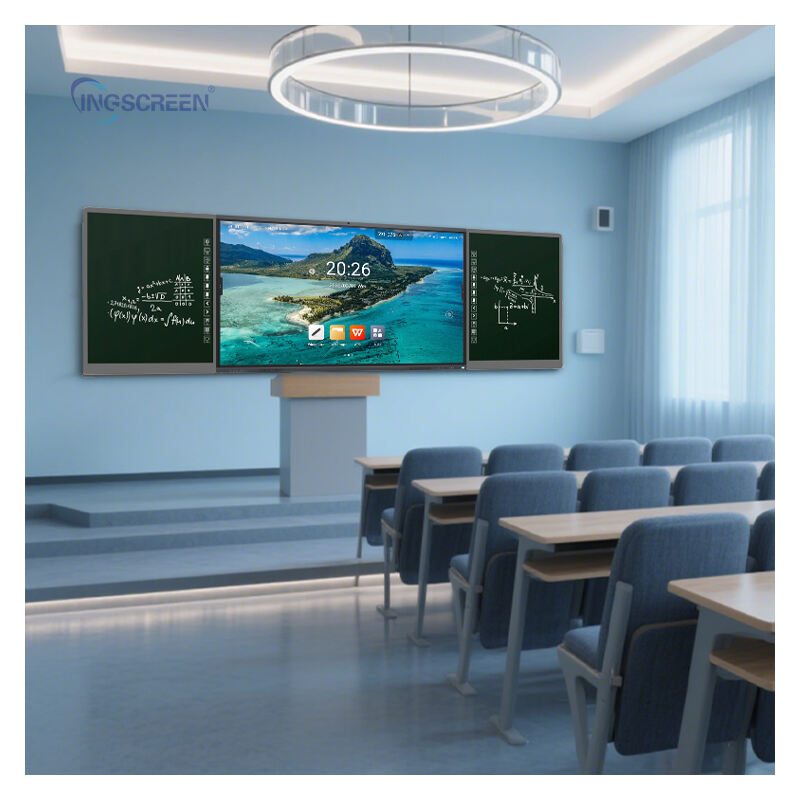
Revolutionary Features of Interactive Blackboard Technology
Touch-Sensitive Display Capabilities
The interactive blackboard incorporates advanced touch-sensitive technology that responds instantly to finger gestures, stylus input, and multi-touch interactions. This responsive interface allows educators to manipulate digital content with unprecedented precision and fluidity. Teachers can zoom into detailed diagrams, rotate three-dimensional models, and annotate directly over multimedia presentations without requiring additional peripherals or complex setup procedures. The touch sensitivity extends beyond simple navigation, enabling sophisticated gesture recognition that supports natural writing motions and drawing techniques that closely mimic traditional blackboard experiences while offering digital advantages.
Students benefit from this intuitive interface design as they can directly interact with lesson materials, solving mathematical equations by writing directly on the screen or manipulating scientific simulations through touch commands. The multi-user capability of modern interactive blackboard systems allows multiple students to collaborate simultaneously on the same surface, fostering teamwork and peer learning opportunities that traditional teaching tools cannot provide. This collaborative functionality transforms passive learning into active participation, encouraging students to engage more deeply with subject matter through hands-on exploration.
Integrated Multimedia Support
Contemporary interactive blackboard solutions seamlessly integrate various multimedia formats including high-definition video, interactive animations, immersive simulations, and rich audio content. This multimedia compatibility enables educators to incorporate diverse learning resources directly into their lessons without switching between multiple devices or platforms. Teachers can display educational videos, interactive maps, virtual laboratory experiments, and real-time data visualizations that enhance comprehension across different subject areas. The integrated approach eliminates technical barriers that often discourage educators from incorporating multimedia elements into their teaching practices.
The multimedia capabilities extend to real-time internet connectivity, allowing teachers to access current information, live educational broadcasts, and cloud-based resources during lessons. This connectivity transforms the classroom into a window to global knowledge repositories, enabling students to explore current events, scientific discoveries, and cultural phenomena as they occur. The interactive blackboard serves as a central hub that consolidates these diverse resources into cohesive learning experiences that maintain student attention and promote deeper understanding through varied sensory inputs.
Educational Benefits and Learning Enhancement
Improved Student Engagement Levels
Research consistently demonstrates that interactive blackboard implementation significantly increases student engagement and participation rates across all age groups and subject areas. The visual and tactile nature of interactive learning appeals to multiple learning modalities simultaneously, ensuring that visual learners, kinesthetic learners, and auditory learners all benefit from enhanced instructional delivery. Students report higher levels of interest and motivation when lessons incorporate interactive elements that allow them to manipulate content directly rather than simply observing static presentations. This engagement translates into improved attention spans and reduced classroom management issues.
The gamification potential of interactive blackboard technology introduces elements of play and competition that naturally motivate students to participate actively in learning activities. Educational games, interactive quizzes, and collaborative problem-solving exercises become seamlessly integrated into regular curriculum delivery, making learning more enjoyable while maintaining educational rigor. Teachers observe increased voluntary participation, improved question-asking behavior, and enhanced peer-to-peer learning interactions when interactive blackboard technology forms the foundation of instructional methodology.
Enhanced Comprehension and Retention
The multi-sensory learning experience provided by interactive blackboard technology significantly improves information retention rates compared to traditional teaching methods. Complex concepts become more accessible when students can visualize abstract ideas through interactive diagrams, manipulate variables in real-time simulations, and observe immediate cause-and-effect relationships through digital experiments. This hands-on approach to learning creates stronger neural pathways and memory associations that support long-term retention of educational content. Studies indicate that students who learn through interactive blackboard instruction demonstrate improved test scores and better recall of lesson material weeks after initial instruction.
The interactive blackboard facilitates differentiated instruction by allowing teachers to present the same concepts through multiple representation methods within a single lesson. Visual learners benefit from rich graphics and animations, while kinesthetic learners engage through touch interactions and gesture-based controls. This adaptive presentation capability ensures that individual learning preferences are accommodated without requiring separate lesson preparations or additional resources. The technology supports immediate feedback mechanisms that help students identify and correct misunderstandings before they become ingrained learning obstacles.
Technical Advantages and Classroom Integration
User-Friendly Interface Design
Modern interactive blackboard systems prioritize intuitive operation that requires minimal technical expertise from educators and students alike. The user interface design follows familiar touchscreen conventions that most users already understand from smartphone and tablet experiences, reducing the learning curve associated with adopting new classroom technology. Menu systems are logically organized, with frequently used tools easily accessible through prominent placement and clear visual indicators. This accessibility ensures that teachers can focus on pedagogical objectives rather than struggling with technological barriers that might detract from effective instruction delivery.
Software applications designed for interactive blackboard use emphasize simplicity without sacrificing functionality, providing powerful tools through streamlined interfaces that support efficient lesson preparation and delivery. Teachers can quickly access drawing tools, media libraries, internet resources, and collaborative applications through unified control systems that minimize cognitive load during instruction. The consistency of interface design across different interactive blackboard applications creates a cohesive user experience that accelerates adoption and proficiency development among education professionals.
Seamless Technology Integration
The interactive blackboard serves as a central hub that connects various educational technologies into coherent instructional ecosystems. Wireless connectivity enables seamless integration with student devices, allowing for screen sharing, collaborative document editing, and real-time polling that enhances classroom interactivity. Teachers can project student work directly onto the interactive blackboard surface, facilitating peer review sessions and group discussions that promote collaborative learning. This connectivity eliminates the isolation that often characterizes individual device usage in educational settings.
Cloud-based integration capabilities allow teachers to access lesson materials, student progress data, and educational resources from any connected device, providing flexibility in lesson planning and delivery. The interactive blackboard can synchronize with learning management systems, gradebooks, and administrative platforms to create streamlined workflows that reduce administrative burden while improving instructional effectiveness. This integration extends to hardware compatibility with document cameras, microscopes, and other specialized educational equipment that can display output directly on the interactive blackboard surface.
Cost-Effectiveness and Long-Term Value
Reduced Material and Maintenance Costs
The transition to interactive blackboard technology eliminates ongoing expenses associated with traditional classroom materials such as chalk, markers, erasers, and disposable presentation materials. Digital content creation and storage capabilities reduce printing costs while providing unlimited storage capacity for lesson materials, student work samples, and educational resources. The durability of quality interactive blackboard systems ensures years of reliable operation with minimal maintenance requirements, providing favorable return on investment compared to repeatedly replacing consumable teaching materials.
Environmental benefits associated with reduced paper consumption and elimination of chemical cleaning products align with sustainability initiatives that many educational institutions prioritize. The interactive blackboard supports paperless workflows that reduce institutional carbon footprints while demonstrating environmental responsibility to students and communities. Long-term operational savings compound over time, with many institutions reporting significant budget reductions in classroom supply expenses within the first year of interactive blackboard implementation.
Scalability and Future-Proof Investment
Interactive blackboard technology platforms are designed with upgrade pathways that protect initial investments while enabling institutions to adopt emerging educational technologies as they become available. Software updates and feature enhancements typically deploy automatically, ensuring that interactive blackboard capabilities continue expanding without requiring hardware replacement. This scalability supports institutional growth and changing educational requirements without necessitating complete technology overhauls that strain budgets and disrupt established workflows.
The modular design approach of contemporary interactive blackboard systems allows institutions to customize configurations based on specific needs and budget constraints while maintaining upgrade compatibility for future expansion. Professional development investments in interactive blackboard training provide lasting value as skills transfer across technology generations and new applications. The foundational digital literacy skills that educators develop through interactive blackboard use support adoption of future educational technologies, creating cumulative professional development benefits that extend beyond individual technology implementations.
Professional Development and Teacher Support
Comprehensive Training Programs
Successful interactive blackboard implementation requires structured professional development programs that build educator confidence and competency in utilizing advanced features effectively. Training programs typically begin with basic operation and gradually progress to sophisticated applications that leverage the full potential of interactive blackboard technology. Hands-on workshops provide opportunities for teachers to practice techniques, explore creative applications, and collaborate with colleagues to develop innovative instructional approaches that maximize student engagement and learning outcomes.
Ongoing support systems including online resources, peer mentoring networks, and technical assistance ensure that teachers continue developing interactive blackboard expertise throughout their careers. Professional learning communities focused on interactive blackboard applications provide forums for sharing best practices, troubleshooting challenges, and discovering new educational applications. This collaborative approach to professional development accelerates adoption rates while building institutional capacity for effective technology integration across all subject areas and grade levels.
Curriculum Integration Strategies
Effective interactive blackboard implementation requires systematic curriculum integration that aligns technology features with specific learning objectives and educational standards. Professional development programs teach educators to identify opportunities where interactive blackboard capabilities enhance traditional instruction rather than simply digitizing existing practices. This strategic approach ensures that technology adoption supports pedagogical goals and improves student learning outcomes rather than creating additional complexity without corresponding benefits.
Subject-specific training modules help teachers understand how interactive blackboard features support discipline-specific instruction in mathematics, science, language arts, social studies, and other curriculum areas. Mathematics teachers learn to use interactive graphing tools and geometric construction applications, while science educators explore virtual laboratory simulations and data visualization capabilities. This targeted approach to professional development ensures that teachers develop relevant skills that directly impact their daily instructional practices and student achievement outcomes.
FAQ
What makes an interactive blackboard different from a regular smartboard
An interactive blackboard offers superior touch sensitivity, higher resolution displays, and more advanced software capabilities compared to basic smartboards. Interactive blackboards typically feature multi-user functionality, gesture recognition, and seamless integration with various educational applications. The technology includes enhanced connectivity options, cloud-based storage capabilities, and professional-grade durability designed specifically for intensive classroom use. These advanced features create more engaging and effective learning experiences that support diverse instructional approaches.
How long does it take for teachers to become proficient with interactive blackboard technology
Most teachers achieve basic proficiency with interactive blackboard operation within two to three weeks of regular use, while advanced feature mastery typically develops over several months of consistent application. The intuitive touchscreen interface and familiar software conventions accelerate the learning process for educators who already use smartphones or tablets regularly. Structured training programs and ongoing support significantly reduce the time required to achieve full integration of interactive blackboard capabilities into daily instruction. Individual learning curves vary based on prior technology experience and willingness to experiment with new features.
Can interactive blackboards work with existing classroom technology
Modern interactive blackboards are designed with extensive compatibility features that integrate seamlessly with laptops, tablets, document cameras, microscopes, and other common classroom technologies. Wireless connectivity protocols support screen mirroring, file sharing, and collaborative applications across different device types and operating systems. Most interactive blackboard systems include multiple input options including USB, HDMI, and wireless connections that accommodate various technology configurations. This compatibility ensures that existing technology investments continue providing value while enhancing capabilities through interactive blackboard integration.
What are the maintenance requirements for interactive blackboard systems
Interactive blackboard maintenance typically involves routine software updates, periodic screen cleaning with appropriate materials, and occasional calibration adjustments to maintain optimal touch sensitivity. Most systems include automatic diagnostic features that identify potential issues before they impact classroom functionality. Professional maintenance services are available for complex repairs or hardware upgrades, though quality interactive blackboards are designed for years of reliable operation with minimal intervention. Regular maintenance schedules help ensure consistent performance and extend equipment lifespan while protecting technology investments.
Table of Contents
- Revolutionary Features of Interactive Blackboard Technology
- Educational Benefits and Learning Enhancement
- Technical Advantages and Classroom Integration
- Cost-Effectiveness and Long-Term Value
- Professional Development and Teacher Support
-
FAQ
- What makes an interactive blackboard different from a regular smartboard
- How long does it take for teachers to become proficient with interactive blackboard technology
- Can interactive blackboards work with existing classroom technology
- What are the maintenance requirements for interactive blackboard systems

