

 EN
EN
Corporate meeting environments have experienced a dramatic transformation in recent years, with traditional presentation methods giving way to more dynamic and engaging solutions. The interactive panel has emerged as a cornerstone technology that fundamentally changes how teams collaborate, present information, and make decisions during corporate meetings. These sophisticated display systems combine the functionality of traditional whiteboards, projectors, and computers into a single, touchscreen-enabled platform that responds to multiple users simultaneously.
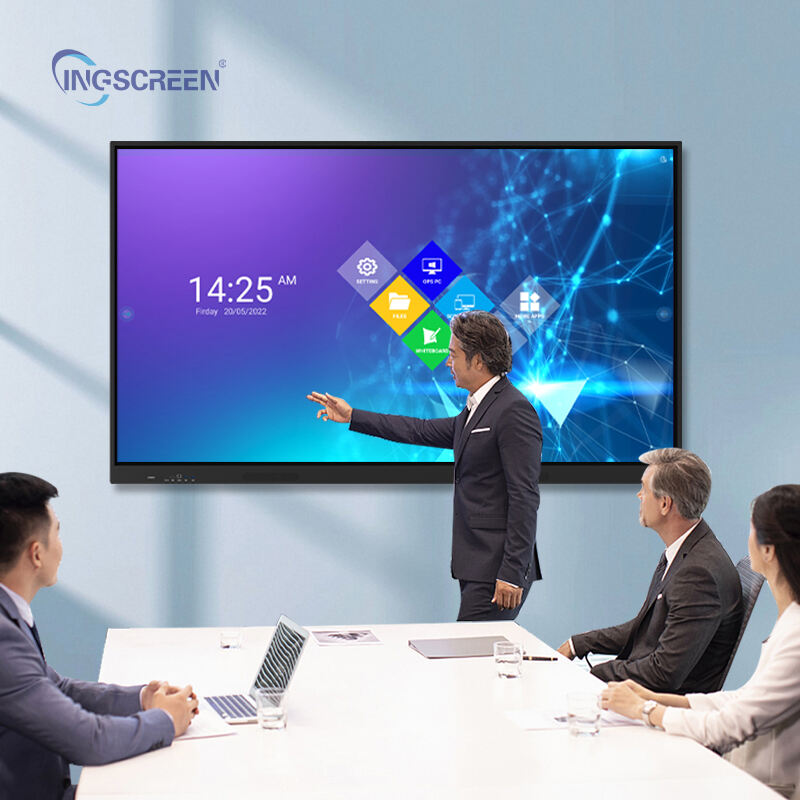
The popularity of interactive panel technology in corporate settings stems from its ability to address multiple pain points that have long plagued business meetings. From eliminating technical setup delays to enabling real-time collaboration across remote locations, these systems deliver measurable improvements in meeting productivity and participant engagement. Understanding the specific benefits that drive adoption helps organizations evaluate whether implementing interactive panel solutions aligns with their meeting effectiveness goals and digital transformation initiatives.
Enhanced Collaboration and Real-Time Interaction
Multi-User Touch Capabilities Transform Group Dynamics
The interactive panel enables multiple participants to simultaneously interact with displayed content, fundamentally changing how teams engage during meetings. Unlike traditional presentation setups where only one person controls the display, an interactive panel allows several team members to annotate, highlight, or manipulate content at the same time. This capability eliminates the bottleneck effect where ideas must be filtered through a single presenter, instead enabling direct participation from all attendees.
Corporate teams report significant improvements in brainstorming sessions when using interactive panel technology, as participants can immediately capture and build upon ideas without waiting for turn-taking protocols. The touch-responsive surface recognizes different users' inputs, allowing for natural collaboration patterns that mirror how people work together on physical whiteboards but with digital advantages like unlimited space, instant saving, and seamless sharing capabilities.
Meeting facilitators particularly benefit from the interactive panel's ability to maintain engagement throughout longer sessions. Participants remain actively involved rather than passively consuming information, leading to higher retention rates and more productive outcomes. The technology supports both structured presentations and free-form collaboration, adapting to different meeting styles and organizational cultures without requiring significant process changes.
Seamless Integration with Digital Workflows
Modern interactive panel systems integrate directly with popular business applications and cloud-based collaboration platforms, eliminating the friction typically associated with switching between different tools during meetings. Participants can access shared documents, spreadsheets, and presentation files directly on the panel surface, making edits and annotations that automatically sync with the original files stored in corporate systems.
The integration capabilities extend to video conferencing platforms, allowing remote participants to view and interact with panel content in real-time. This feature proves particularly valuable for organizations with distributed teams or those conducting hybrid meetings where some attendees participate virtually. Remote users can contribute annotations, share their screens to the interactive panel, and participate in collaborative activities as if they were physically present in the meeting room.
Document management becomes significantly more efficient when teams utilize an interactive panel for their corporate meetings. Changes made during discussions are automatically captured and can be distributed to all participants immediately after the meeting concludes, eliminating the need for separate note-taking or manual distribution processes that often delay follow-up actions.
Streamlined Technical Setup and Reliability
Elimination of Complex Equipment Configuration
Traditional meeting rooms often require multiple pieces of equipment including projectors, screens, cables, and various adapters to accommodate different devices and presentation formats. The interactive panel consolidates these functions into a single unit, dramatically reducing setup time and eliminating compatibility issues that frequently disrupt meeting schedules. IT departments report substantial reductions in support tickets related to meeting room technical problems after implementing interactive panel solutions.
The plug-and-play nature of modern interactive panel technology means that presenters can begin their sessions immediately without testing connections, adjusting display settings, or troubleshooting audio-visual problems. Built-in wireless connectivity allows participants to share content from laptops, tablets, and smartphones without physical cables, accommodating the diverse device preferences common in corporate environments.
Meeting organizers appreciate the predictable performance that interactive panel systems provide, as these integrated solutions undergo comprehensive testing and quality assurance processes that ensure consistent operation. Unlike cobbled-together setups using multiple vendors' equipment, interactive panel installations offer single-point accountability for technical performance and simplified maintenance procedures.
Reduced Dependency on IT Support
Interactive panel systems feature intuitive interfaces designed for business users rather than technical specialists, enabling meeting participants to operate the equipment without requiring IT assistance. This self-sufficiency reduces delays caused by waiting for technical support and allows teams to focus on their meeting objectives rather than troubleshooting presentation technology.
The simplified operation extends to routine tasks like connecting devices, switching between input sources, and saving meeting content. Most interactive panel solutions include guided setup processes and clear visual indicators that help users navigate functionality without extensive training. This user-friendly approach reduces the learning curve associated with new meeting room technology and encourages adoption across different departments and skill levels.
Corporate training requirements decrease significantly when organizations implement interactive panel technology, as the familiar touch-screen interface mirrors the smartphone and tablet experiences that most business professionals already understand. This familiarity accelerates adoption rates and reduces the resistance to change often encountered when introducing new workplace technologies.
Improved Presentation Quality and Visual Impact
Superior Display Resolution and Clarity
Modern interactive panel displays deliver exceptional image quality that surpasses traditional projection systems, particularly in meeting rooms with ambient lighting challenges. The high-resolution screens ensure that detailed charts, small text, and complex diagrams remain clearly visible to all participants regardless of their seating position. This visual clarity proves especially important during data-intensive presentations where participants need to examine specific metrics or technical specifications.
The enhanced visual quality directly impacts meeting effectiveness by reducing eye strain and maintaining participant attention throughout longer sessions. Unlike projected images that can appear washed out or difficult to read, interactive panel displays maintain consistent brightness and color accuracy that keeps presentations engaging and professional in appearance.
Interactive panel technology eliminates common projection problems such as shadows created by presenters standing in front of the screen, hot spots from uneven lighting, and image distortion caused by improper projector alignment. These improvements contribute to a more polished and professional meeting environment that reflects positively on the organization's commitment to quality and innovation.
Dynamic Content Manipulation Capabilities
The interactive panel enables presenters to manipulate content in real-time, zooming into specific sections of documents, rotating images for better viewing angles, and highlighting important information with touch gestures. This dynamic interaction capability maintains audience engagement and allows presentations to adapt based on participant questions or areas of interest that emerge during discussions.
Presenters can seamlessly switch between different types of content including presentations, web browsers, video files, and collaborative applications without the technical delays associated with traditional setups. This flexibility supports more dynamic and responsive meeting formats where content can be adjusted based on the flow of discussion rather than rigid predetermined agendas.
The ability to annotate and markup presentation materials during live discussions adds significant value to corporate meetings, as participants can capture insights, questions, and action items directly on the relevant content. These annotations become part of the permanent meeting record and can be referenced in future sessions or shared with stakeholders who were unable to attend the original meeting.
Cost Efficiency and Long-Term Value
Reduced Meeting Room Infrastructure Costs
Organizations implementing interactive panel solutions often experience significant cost savings compared to traditional meeting room setups that require separate projectors, screens, whiteboards, and audio systems. The all-in-one nature of interactive panel technology reduces both initial capital expenditure and ongoing maintenance costs associated with multiple equipment pieces from different manufacturers.
The space efficiency gained by consolidating multiple functions into a single interactive panel unit allows organizations to optimize their meeting room layouts and potentially accommodate more participants in existing spaces. This space optimization can delay or eliminate the need for additional meeting room construction or rental, providing substantial real estate cost savings in expensive commercial markets.
Energy consumption typically decreases when organizations replace multiple pieces of meeting room equipment with integrated interactive panel systems. These modern displays incorporate energy-efficient technologies and automatic power management features that reduce electricity costs compared to traditional projector-based setups that consume significant power for both the projection unit and cooling systems.
Measurable Productivity Improvements
Corporate productivity metrics show measurable improvements when teams utilize interactive panel technology for their regular meetings and collaboration sessions. Reduced setup time, faster decision-making processes, and improved information retention contribute to shorter meetings that accomplish more objectives, effectively reducing the total time investment required for team coordination and project management activities.
The enhanced collaboration capabilities of interactive panel systems often lead to better meeting outcomes, including clearer action items, improved consensus building, and more effective problem-solving processes. These qualitative improvements translate into quantifiable business value through faster project completion times, reduced rework, and improved team alignment on strategic initiatives.
Training and onboarding processes become more efficient when organizations incorporate interactive panel technology into their learning and development programs. New employees can participate in more engaging orientation sessions, while existing staff benefit from more effective knowledge transfer during training updates and skill development programs.
FAQ
What technical requirements are needed to install an interactive panel in a corporate meeting room?
Most interactive panel installations require standard electrical power connection, network connectivity for internet access and integration with corporate systems, and adequate wall mounting support for the display unit. The specific requirements vary by model, but typical installations need minimal room modifications beyond wall mounting hardware and cable management. Many organizations find that existing meeting rooms can accommodate interactive panel technology without major renovations.
How does an interactive panel integrate with existing video conferencing systems?
Modern interactive panel systems include built-in compatibility with popular video conferencing platforms and can serve as both the display and input device for virtual meetings. The panels typically feature integrated cameras, microphones, and speakers, or can connect to existing conference room audio-visual equipment. Remote participants can view and interact with panel content through screen sharing capabilities, enabling full participation in collaborative activities regardless of their physical location.
What is the typical learning curve for employees to become proficient with interactive panel technology?
Most business professionals adapt to interactive panel operation within one or two meeting sessions, as the touch-screen interface resembles familiar smartphone and tablet experiences. Organizations typically provide brief orientation sessions covering basic functions like content sharing, annotation tools, and saving capabilities. The intuitive design of modern interactive panel systems minimizes formal training requirements, and many users discover advanced features through natural exploration during regular use.
Can interactive panels accommodate different presentation formats and file types commonly used in corporate environments?
Interactive panel systems support standard business file formats including PowerPoint presentations, PDF documents, Excel spreadsheets, Word documents, and various image and video formats. Many panels include built-in applications for creating and editing content directly on the device, while also providing seamless integration with cloud-based storage systems and collaboration platforms commonly used in corporate environments. The systems typically include universal file viewing capabilities that eliminate compatibility concerns when participants bring content from different software applications.
Table of Contents
- Enhanced Collaboration and Real-Time Interaction
- Streamlined Technical Setup and Reliability
- Improved Presentation Quality and Visual Impact
- Cost Efficiency and Long-Term Value
-
FAQ
- What technical requirements are needed to install an interactive panel in a corporate meeting room?
- How does an interactive panel integrate with existing video conferencing systems?
- What is the typical learning curve for employees to become proficient with interactive panel technology?
- Can interactive panels accommodate different presentation formats and file types commonly used in corporate environments?

