

 EN
EN

Modern educational environments demand technology solutions that enhance learning engagement and facilitate seamless interaction between educators and students. The selection of an interactive panel represents a critical investment decision that impacts classroom dynamics, student participation, and overall teaching effectiveness. Educational institutions must carefully evaluate multiple factors to ensure their chosen interactive panel aligns with pedagogical goals while providing reliable performance and long-term value.
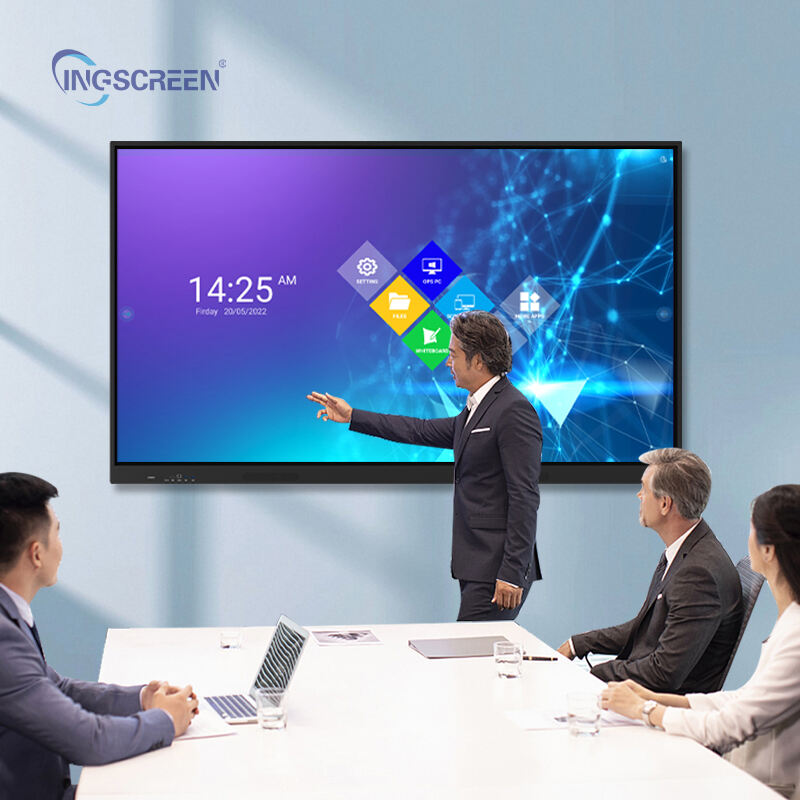
Understanding Interactive Panel Technology Fundamentals
Display Technology and Visual Quality
The visual foundation of any interactive panel relies on advanced display technology that delivers crisp, clear imagery across various lighting conditions. Modern interactive panel solutions utilize LED backlit LCD technology or OLED displays to provide vibrant colors and sharp contrast ratios. Resolution specifications significantly impact content visibility, with 4K Ultra HD becoming the standard for larger classroom displays. Educators must consider screen size relative to classroom dimensions, ensuring all students maintain clear sightlines regardless of seating position.
Brightness levels and anti-glare coatings play crucial roles in maintaining visibility under fluorescent classroom lighting or natural sunlight exposure. Professional-grade interactive panel units typically feature brightness ratings between 350-500 nits, providing adequate illumination without causing eye strain. The display technology directly influences color accuracy, which becomes particularly important for subjects requiring precise visual representation such as art, science, or geography instruction.
Touch Response and Multi-Point Interaction
Touch sensitivity represents the core functionality that distinguishes an interactive panel from traditional display systems. Advanced touch technology enables simultaneous multi-point interaction, allowing multiple students to engage with content simultaneously. Infrared touch technology and capacitive touch solutions each offer distinct advantages depending on classroom usage patterns and maintenance requirements.
Response time and touch accuracy directly impact user experience quality, particularly during collaborative activities or fast-paced instruction sessions. Premium interactive panel systems provide sub-millisecond response times and palm rejection technology, enabling natural writing experiences similar to traditional whiteboards. The touch point recognition capability should support at least 10-20 simultaneous touches to accommodate small group collaboration scenarios effectively.
Software Integration and Compatibility Considerations
Operating System and Platform Support
Educational technology ecosystems require seamless integration across multiple platforms and devices commonly used in academic settings. An effective interactive panel must support various operating systems including Windows, macOS, iOS, and Android platforms. Cloud-based applications and learning management systems integration capabilities ensure educators can access existing digital resources without technical barriers or workflow disruptions.
Built-in software packages often include annotation tools, screen recording capabilities, and collaborative workspace applications designed specifically for educational environments. Compatibility with popular educational software such as Google Classroom, Microsoft Teams, and specialized subject-specific applications expands instructional possibilities while maintaining familiar user interfaces for both teachers and students.
Wireless Connectivity and Device Management
Wireless screen sharing capabilities enable students and teachers to display content from personal devices without physical cable connections. Screen mirroring protocols such as Miracast, AirPlay, and Chromecast support ensure broad device compatibility across different manufacturer ecosystems. Network security features protect classroom environments while allowing controlled access to shared content and resources.
Device management tools provide administrators with centralized control over multiple interactive panel installations throughout educational facilities. Remote monitoring, software updates, and usage analytics help maintain optimal performance while providing insights into technology utilization patterns across different classrooms and subject areas.
Physical Design and Installation Requirements
Mounting Options and Space Optimization
Classroom space constraints require flexible mounting solutions that accommodate various room layouts and furniture arrangements. Wall-mounted interactive panel installations provide permanent positioning while mobile cart systems offer flexibility for shared resources across multiple classrooms. Height adjustment capabilities ensure accessibility for users of different ages and physical abilities, promoting inclusive learning environments.
Cable management systems and integrated connection ports minimize visual clutter while providing easy access to necessary inputs and outputs. Power requirements and electrical infrastructure compatibility must align with existing classroom facilities to avoid costly renovation projects. Proper ventilation and thermal management prevent overheating issues that could impact reliability and longevity.
Durability and Maintenance Considerations
Educational environments subject technology equipment to intensive daily use across multiple user sessions. Robust construction materials and reinforced screen surfaces resist damage from accidental impacts or inappropriate handling. Tempered glass surfaces with scratch-resistant coatings maintain visual clarity and touch sensitivity over extended periods of continuous operation.
Maintenance requirements should align with available technical support resources within educational institutions. Self-diagnostic features and remote troubleshooting capabilities reduce downtime while minimizing the need for specialized technical expertise. Warranty coverage and local service availability ensure prompt resolution of any performance issues that may arise during regular classroom usage.
Budget Planning and Total Cost of Ownership
Initial Investment and Specification Matching
Interactive panel pricing varies significantly based on screen size, feature sets, and build quality specifications. Educational budgets must balance desired functionality with available funding while considering long-term value propositions. Bulk purchasing agreements and educational discounts can provide substantial savings for multi-unit deployments across school districts or university campuses.
Specification matching ensures purchased equipment meets actual classroom needs without unnecessary premium features that inflate costs. Basic interactive panel models may suffice for simple presentation tasks, while advanced collaborative learning environments require comprehensive feature sets including interactive panel systems with sophisticated software integration and multi-user capabilities.
Operational Costs and Lifecycle Management
Beyond initial purchase prices, ongoing operational expenses include electricity consumption, software licensing fees, and periodic maintenance costs. Energy-efficient interactive panel designs reduce long-term electrical expenses while contributing to sustainability initiatives within educational institutions. Extended warranty options and service contracts provide predictable maintenance budgets while ensuring consistent performance standards.
Technology refresh cycles typically span 5-7 years for educational interactive panel installations, requiring strategic planning for future upgrades and compatibility considerations. Residual value retention and equipment recycling programs help offset replacement costs while supporting environmental responsibility goals. Comprehensive lifecycle cost analysis provides accurate budgeting information for informed decision-making processes.
Training and Professional Development Requirements
Educator Preparation and Skill Development
Successful interactive panel implementation requires comprehensive training programs that address both technical operation and pedagogical integration strategies. Professional development initiatives should cover basic hardware operation, software navigation, and creative instructional applications that maximize student engagement opportunities. Hands-on workshop sessions provide practical experience with interactive panel features and collaborative learning techniques.
Ongoing support resources including video tutorials, user manuals, and peer mentoring programs help educators develop confidence and proficiency with interactive panel technology. Advanced training modules can explore subject-specific applications and innovative teaching methodologies that leverage interactive capabilities for enhanced learning outcomes. Regular refresher sessions ensure optimal utilization of available features and functions.
Student Orientation and Digital Citizenship
Student preparation programs establish appropriate usage expectations and digital citizenship principles for interactive panel environments. Clear guidelines regarding touch interaction, content sharing protocols, and collaborative workspace etiquette promote positive learning experiences while preventing equipment damage or misuse. Age-appropriate instruction modules can address different grade levels and technological familiarity backgrounds.
Peer teaching opportunities allow technologically proficient students to assist classmates while developing leadership skills and reinforcing proper usage techniques. Integration of interactive panel skills into broader digital literacy curricula ensures students develop transferable technology competencies applicable across multiple academic and professional contexts.
Performance Evaluation and Selection Criteria
Technical Specifications Assessment
Objective evaluation criteria provide systematic comparison methods for different interactive panel options under consideration. Key performance indicators include touch response accuracy, display resolution quality, connectivity options, and software compatibility ratings. Standardized testing protocols can assess durability, reliability, and user experience quality across multiple product alternatives.
Third-party reviews and educational technology publications offer independent assessments of interactive panel performance in real classroom environments. Professional recommendations from experienced educators and technology coordinators provide valuable insights into practical usage considerations and long-term satisfaction levels. Pilot program implementations allow hands-on evaluation before committing to larger-scale purchases.
Vendor Support and Service Quality
Vendor reputation and customer service quality significantly impact long-term satisfaction with interactive panel investments. Comprehensive warranty coverage, responsive technical support, and local service availability ensure minimal disruption to classroom activities when issues arise. Training resources, documentation quality, and ongoing product development support contribute to overall value propositions.
Reference checks with existing customers provide insights into vendor reliability, support responsiveness, and product performance over extended usage periods. Professional references from similar educational institutions offer relevant perspectives on implementation challenges and success factors. Vendor financial stability and market presence indicate likelihood of continued support availability throughout expected equipment lifecycles.
Implementation Strategies and Best Practices
Phased Deployment and Change Management
Strategic implementation approaches minimize disruption while maximizing adoption success rates across educational institutions. Phased deployment schedules allow gradual integration of interactive panel technology with adequate time for training and adjustment between installation phases. Priority classroom selections based on curriculum alignment and educator readiness levels optimize initial success experiences.
Change management strategies address potential resistance to new technology while building enthusiasm and support for interactive learning approaches. Champion educator programs identify early adopters who can demonstrate successful applications and provide peer mentoring for colleagues. Regular feedback collection and adjustment processes ensure implementation strategies remain responsive to actual usage experiences and emerging needs.
Integration with Existing Technology Infrastructure
Successful interactive panel deployment requires careful integration with existing classroom technology systems and network infrastructure. Compatibility assessments ensure new equipment works seamlessly with current projectors, computers, document cameras, and audio systems already in place. Network capacity evaluations confirm adequate bandwidth for wireless connectivity and content streaming requirements.
IT department coordination ensures proper network configuration, security protocols, and technical support procedures accommodate interactive panel requirements. Standardized installation procedures and configuration templates streamline deployment processes while maintaining consistency across multiple classroom environments. Documentation of integration procedures facilitates troubleshooting and future expansion activities.
FAQ
What screen size interactive panel works best for standard classroom layouts
For typical classroom environments serving 20-30 students, interactive panel sizes between 65-75 inches provide optimal visibility and engagement opportunities. Larger 86-inch models work well for presentation halls or collaborative learning spaces, while smaller 55-inch units may suffice for small group instruction areas. The key consideration involves ensuring all students can clearly see content details from their furthest seating positions while maintaining comfortable viewing angles throughout the classroom space.
How important is 4K resolution for educational interactive panels
4K Ultra HD resolution significantly enhances text clarity and image detail quality, particularly important for displaying complex diagrams, detailed maps, or fine text content common in educational materials. While Full HD resolution may appear adequate for basic presentations, 4K displays provide superior visual quality that reduces eye strain and improves content legibility across larger screen sizes. The investment in 4K resolution pays dividends through improved student engagement and reduced visual fatigue during extended classroom sessions.
Can interactive panels integrate with existing classroom management software
Modern interactive panel systems typically support integration with popular classroom management platforms including Google Classroom, Microsoft Teams for Education, and various learning management systems through built-in applications or web-based access. Many models include screen sharing capabilities that work with existing device management solutions and network authentication systems. Compatibility verification with specific software platforms should be confirmed during the selection process to ensure seamless integration with current educational technology ecosystems.
What training timeline should schools expect for interactive panel adoption
Effective interactive panel adoption typically requires 2-4 weeks of basic training followed by ongoing professional development over 6-12 months for full integration into teaching practices. Initial training sessions covering basic operation and core features usually require 4-8 hours of dedicated instruction time. Advanced applications and creative teaching methodologies develop through continued practice and peer collaboration, with most educators achieving comfortable proficiency levels within one academic semester of regular usage and support.
Table of Contents
- Understanding Interactive Panel Technology Fundamentals
- Software Integration and Compatibility Considerations
- Physical Design and Installation Requirements
- Budget Planning and Total Cost of Ownership
- Training and Professional Development Requirements
- Performance Evaluation and Selection Criteria
- Implementation Strategies and Best Practices
- FAQ

