

 EN
EN

Training sessions often struggle with participant disengagement, passive learning environments, and limited interaction between instructors and learners. Traditional training methods, while foundational, frequently fail to capture attention or foster meaningful participation in today's dynamic workplace learning environments. The challenge becomes even more pronounced when dealing with diverse learning styles, remote participants, or complex technical subject matter that requires hands-on demonstration and collaborative problem-solving.
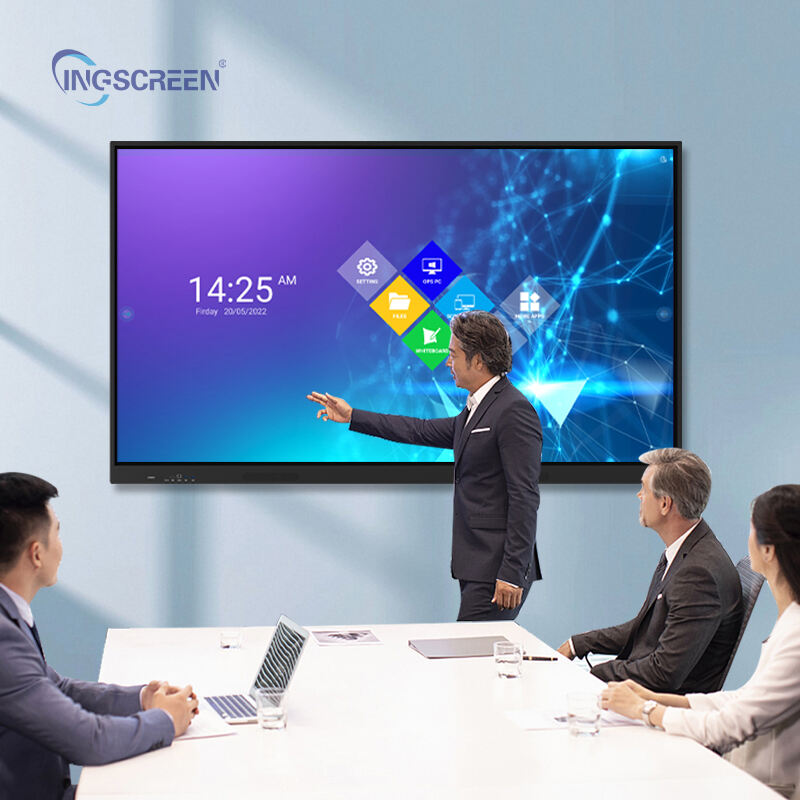
Modern interactive panel technology addresses these training challenges by transforming passive learning environments into dynamic, collaborative spaces where participants actively engage with content and each other. These advanced display solutions enable instructors to create immersive training experiences that combine visual learning, tactile interaction, and real-time collaboration, fundamentally changing how knowledge transfer occurs in professional development settings. By integrating touch-responsive displays with multimedia capabilities, organizations can significantly enhance learning outcomes and participant satisfaction.
Understanding Interactive Panel Technology in Training Contexts
Core Interactive Panel Features for Educational Applications
Interactive panel systems integrate high-resolution displays with advanced touch recognition technology, creating responsive surfaces that support multi-user interaction simultaneously. These systems typically feature ultra-high-definition screens ranging from 55 to 98 inches, providing clear visibility for groups of varying sizes while maintaining crisp image quality at close viewing distances. The touch sensitivity allows participants to directly manipulate content, annotate materials, and collaborate on projects using natural finger gestures or specialized stylus tools.
Modern interactive panel implementations include built-in computing capabilities, wireless connectivity options, and compatibility with various software applications designed for educational and professional training environments. The technology supports real-time content sharing from multiple devices, enabling seamless integration of participant laptops, tablets, and smartphones into the training experience. This connectivity extends training possibilities beyond the physical classroom, accommodating hybrid learning scenarios where some participants join remotely.
Technical Specifications That Enhance Training Effectiveness
Professional-grade interactive panel systems incorporate low-latency touch response technology, ensuring immediate feedback when participants interact with displayed content. The precision touch recognition supports simultaneous multi-point interaction, allowing multiple learners to work on different areas of the screen concurrently without interference. This capability proves particularly valuable during collaborative exercises, brainstorming sessions, and group problem-solving activities where multiple perspectives need simultaneous expression.
Advanced interactive panel configurations include integrated camera systems, microphone arrays, and speaker systems that support video conferencing and remote collaboration features. These components enable training sessions to incorporate distant experts, facilitate cross-location team building exercises, and provide opportunities for real-time consultation with subject matter specialists who cannot physically attend training sessions. The built-in annotation tools allow instructors to highlight key concepts, draw diagrams, and create visual explanations that enhance comprehension and retention.
Engagement Enhancement Mechanisms Through Interactive Technology
Active Participation Strategies Using Touch-Based Interfaces
Interactive panel technology transforms training participants from passive observers into active contributors by providing immediate opportunities for hands-on engagement with training materials. Learners can directly manipulate charts, graphs, and diagrams, exploring cause-and-effect relationships through tactile interaction rather than theoretical explanation alone. This direct manipulation capability enables participants to experiment with different scenarios, test hypotheses, and observe immediate results of their decisions in simulated environments.
The tactile nature of interactive panel interaction appeals to kinesthetic learners who benefit from physical engagement with educational content. Participants can drag and drop elements, resize components, rotate objects, and perform other manipulative actions that reinforce learning through multiple sensory channels. This multi-sensory approach increases information retention rates and helps accommodate different learning preferences within the same training session, ensuring broader participant engagement across diverse groups.
Real-Time Collaboration and Group Dynamics
Interactive panel systems facilitate dynamic group collaboration by supporting simultaneous multi-user interaction, enabling team-based exercises that mirror real workplace collaboration scenarios. Participants can work together on shared digital canvases, contributing ideas, building upon colleagues' suggestions, and developing solutions collectively rather than individually. This collaborative approach strengthens team cohesion while delivering training content, creating dual benefits of skill development and relationship building.
The real-time nature of interactive panel collaboration allows instructors to observe group dynamics, identify knowledge gaps, and provide immediate feedback based on participant responses and interaction patterns. Instructors can save collaboration sessions, review participant contributions, and use this information to customize follow-up training materials or address specific learning needs identified during active sessions.
Learning Outcome Improvements Through Interactive Panel Implementation
Enhanced Information Retention and Comprehension Rates
Research in educational technology demonstrates significant improvements in information retention when learners engage with content through multiple interaction modalities simultaneously. Interactive panel technology supports this enhanced retention by combining visual, auditory, and kinesthetic learning channels within single training exercises. Participants who manipulate content directly show improved understanding of complex concepts compared to those who observe demonstrations passively, leading to measurable improvements in post-training assessment scores.
The immediate feedback capabilities of interactive panel systems allow participants to test their understanding in real-time, identifying misconceptions before they become ingrained learning obstacles. Interactive quizzes, drag-and-drop exercises, and scenario simulations provide instant validation or correction, enabling learners to adjust their understanding immediately rather than discovering errors during formal assessments. This continuous feedback loop accelerates the learning process and reduces the time required to achieve training objectives.
Adaptability to Different Learning Styles and Preferences
Interactive panel technology accommodates visual learners through high-resolution displays that present information clearly and attractively, while supporting auditory learners through integrated sound systems that deliver clear explanations and multimedia content. Kinesthetic learners benefit from direct touch interaction capabilities, while logical learners appreciate the structured navigation and systematic progression through training materials that interactive panel software typically provides.
The flexibility of interactive panel systems allows instructors to modify presentation styles dynamically based on participant responses and engagement levels observed during training sessions. Instructors can switch between presentation modes, adjust content complexity, introduce additional examples, or pivot to alternative explanation methods based on real-time assessment of participant comprehension and engagement levels.
Practical Implementation Strategies for Training Organizations
Integration with Existing Training Infrastructure
Successful interactive panel implementation requires careful consideration of existing training room layouts, technical infrastructure, and instructor capabilities to ensure seamless integration with established training processes. Organizations must evaluate power requirements, network connectivity capabilities, and physical mounting considerations to support interactive panel installations that enhance rather than disrupt existing training operations. Proper planning includes assessment of room acoustics, lighting conditions, and seating arrangements that optimize interactive panel visibility and accessibility for all participants.
Training organizations benefit from developing standard operating procedures for interactive panel usage, including equipment startup sequences, software navigation protocols, and troubleshooting guidelines that enable consistent implementation across multiple training facilitators. These procedures should address content preparation requirements, file sharing protocols, and backup strategies that ensure training continuity even when technical issues arise during sessions.
Instructor Training and Change Management Considerations
Effective interactive panel utilization requires comprehensive instructor training programs that address both technical operation skills and pedagogical strategies for maximizing engagement benefits. Training facilitators need hands-on experience with interactive panel features, software applications, and troubleshooting procedures before implementing these technologies in formal training sessions. Change management strategies should address potential resistance to technology adoption while highlighting practical benefits that enhance rather than complicate instruction delivery.
Organizations should establish ongoing support systems that provide instructors with technical assistance, advanced feature training, and opportunities to share effective implementation strategies with colleagues. Regular evaluation of interactive panel usage effectiveness helps identify areas for improvement and ensures that technology investments translate into measurable training outcome improvements.
Measuring and Optimizing Interactive Panel Training Effectiveness
Assessment Methods for Engagement Level Evaluation
Measuring the effectiveness of interactive panel implementation in training requires both quantitative metrics and qualitative feedback collection methods that capture changes in participant engagement, learning outcomes, and satisfaction levels. Organizations can track interaction frequency, session duration, content manipulation patterns, and collaboration participation rates through built-in analytics features available in most interactive panel software applications. These metrics provide objective data about participant engagement levels and help identify content areas that generate highest and lowest interaction rates.
Qualitative assessment methods include participant surveys, focus groups, and instructor observations that capture subjective experiences with interactive panel technology. Feedback collection should address ease of use, perceived learning benefits, preference comparisons with traditional training methods, and suggestions for improvement. Combining quantitative interaction data with qualitative feedback provides comprehensive insights into interactive panel effectiveness and guides optimization efforts.
Continuous Improvement Strategies for Interactive Training Programs
Successful interactive panel training programs require ongoing refinement based on participant feedback, instructor observations, and learning outcome assessments that identify opportunities for enhancement. Organizations should establish regular review cycles that evaluate content effectiveness, technical performance, and participant satisfaction to ensure interactive panel investments continue delivering value over time. These reviews should consider emerging software features, updated training methodologies, and evolving participant expectations that may influence optimal implementation strategies.
Optimization strategies include content library expansion, advanced feature adoption, and cross-training initiatives that maximize interactive panel capabilities while maintaining focus on core training objectives. Organizations benefit from establishing communities of practice among instructors who share effective techniques, troubleshoot challenges collaboratively, and develop innovative applications that extend interactive panel benefits beyond initial implementation scope.
FAQ
What types of training content work best with interactive panel technology?
Interactive panel technology proves most effective with training content that benefits from visual demonstration, collaborative exercises, and hands-on manipulation. Technical training programs, process mapping sessions, problem-solving workshops, and design thinking exercises particularly benefit from interactive panel capabilities. Content involving data analysis, system workflows, collaborative planning, and scenario-based learning experiences show significant engagement improvements when delivered through interactive panel systems compared to traditional presentation methods.
How do interactive panels accommodate remote participants in hybrid training sessions?
Modern interactive panel systems support hybrid training through built-in video conferencing capabilities, screen sharing functions, and collaborative software applications that enable remote participants to view and contribute to interactive sessions. Remote learners can share content to the interactive panel, participate in collaborative exercises through their devices, and maintain visual contact with in-person participants through integrated camera systems. The interactive panel serves as a central hub that bridges physical and virtual participation, ensuring remote learners have equivalent access to training materials and interaction opportunities.
What technical support requirements should organizations consider for interactive panel implementation?
Organizations implementing interactive panel technology should plan for initial setup support, ongoing technical maintenance, software updates, and user training support requirements. Technical support considerations include network infrastructure assessment, equipment installation, software configuration, and integration with existing training management systems. Ongoing support needs include regular software updates, hardware maintenance schedules, troubleshooting assistance, and advanced feature training that ensures optimal system performance and user satisfaction throughout the equipment lifecycle.
How can organizations measure the return on investment for interactive panel training implementations?
ROI measurement for interactive panel training investments should include quantitative metrics such as improved assessment scores, reduced training time requirements, increased participation rates, and enhanced knowledge retention measurements. Organizations can also evaluate qualitative benefits including improved participant satisfaction, enhanced instructor effectiveness, increased training program attendance, and reduced need for follow-up sessions. Long-term ROI considerations include reduced travel costs for remote training delivery, improved employee performance metrics, and enhanced organizational capability for delivering consistent training experiences across multiple locations.
Table of Contents
- Understanding Interactive Panel Technology in Training Contexts
- Engagement Enhancement Mechanisms Through Interactive Technology
- Learning Outcome Improvements Through Interactive Panel Implementation
- Practical Implementation Strategies for Training Organizations
- Measuring and Optimizing Interactive Panel Training Effectiveness
-
FAQ
- What types of training content work best with interactive panel technology?
- How do interactive panels accommodate remote participants in hybrid training sessions?
- What technical support requirements should organizations consider for interactive panel implementation?
- How can organizations measure the return on investment for interactive panel training implementations?

