
 EN
EN
Selecting the right equipment for customer-facing environments is one of the most consequential decisions a business can make. A durable kiosk is no longer a luxury reserved for large enterprises — it has become a practical necessity for retail stores, healthcare facilities, hospitality venues, transportation hubs, and countless other sectors. When a durable kiosk handles hundreds or thousands of interactions every single day, the physical and technical demands placed on it are enormous. Choosing the wrong unit leads to frequent breakdowns, costly maintenance cycles, and frustrated customers who lose confidence in the brand experience.
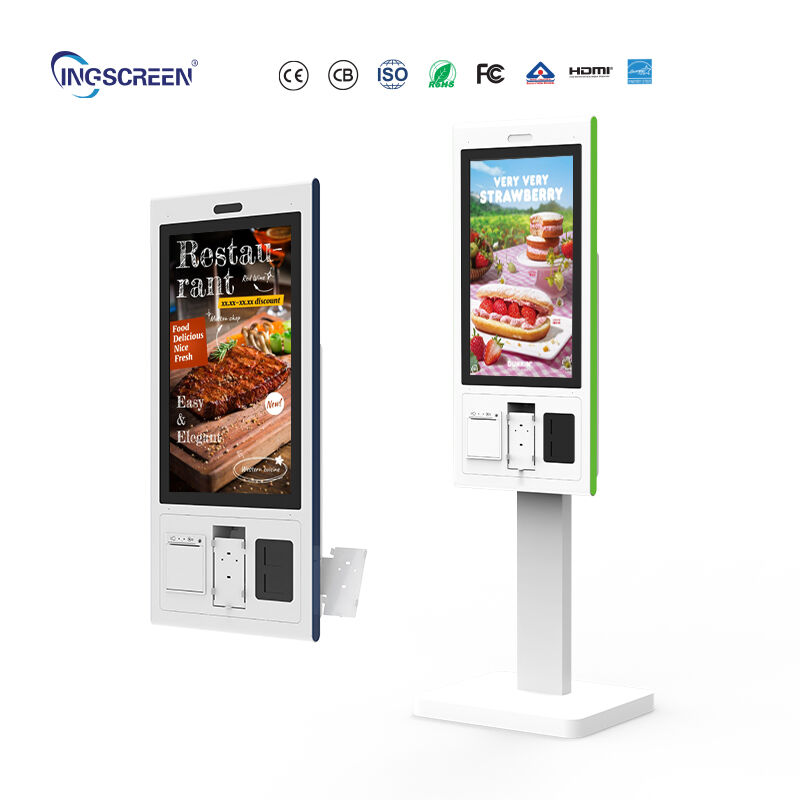
This guide is designed to help businesses make a confident, well-informed decision when investing in a durable kiosk for continuous daily use. Rather than relying on surface-level specifications alone, businesses should evaluate structural integrity, internal component quality, environmental tolerance, and long-term serviceability. A durable kiosk that performs consistently over years of heavy use delivers measurable return on investment, reduces total cost of ownership, and keeps daily operations running without interruption. Understanding what separates a genuinely durable kiosk from a low-cost alternative is essential before committing to any purchase.
Physical Build Quality and Structural Integrity
Enclosure Materials That Withstand Constant Use
The outer enclosure of a durable kiosk is the first line of defense against wear, impact, and environmental stress. High-grade steel or reinforced aluminum housings are widely preferred in commercial settings because they resist dents, scratches, and structural deformation far better than plastic alternatives. A durable kiosk deployed in a busy retail environment or a public transit station must survive accidental collisions, cleaning procedures, and even occasional vandalism attempts. Thin sheet metal or injection-molded plastic enclosures may appear adequate in a showroom but tend to degrade rapidly under real operational conditions. When evaluating a durable kiosk, examine the wall thickness, corner reinforcements, and the quality of hinges or access panels. These details reveal whether the manufacturer has genuinely engineered the unit for longevity or simply minimized production cost.
Touchscreen and Interface Durability
The display interface is the most frequently touched component of any durable kiosk, making its construction critically important. Industrial-grade tempered glass with anti-glare and scratch-resistant coatings performs significantly better than standard consumer-grade panels. A quality durable kiosk should use a projected capacitive touchscreen rated for multi-touch input, with a hardness rating that prevents surface damage from rings, keys, or repeated stylus contact. Sealing standards also matter — a durable kiosk installed near entry points or outdoor areas benefits from IP-rated screen protection against moisture and dust infiltration. Poorly sealed touchscreens accumulate internal condensation and particulate matter, leading to display failures that interrupt daily operations and generate expensive service calls.
Internal Hardware Reliability for High-Volume Operations
Processor and Thermal Management Considerations
A durable kiosk must house computing hardware capable of sustaining consistent performance across extended operating hours. Industrial-grade processors with wide thermal tolerance ranges outperform consumer-grade chips in environments where the unit runs continuously for twelve to twenty-four hours per day. Heat is one of the primary causes of component failure in any durable kiosk, making effective thermal management a non-negotiable requirement. Passive cooling combined with properly designed ventilation channels reduces the risk of overheating without relying entirely on fans that can clog with dust over time. When reviewing a durable kiosk specification sheet, always check the operating temperature range and confirm whether thermal stress testing has been conducted under simulated load conditions. A durable kiosk with inadequate thermal design will experience gradual performance degradation and shortened hardware lifespan regardless of how strong the enclosure appears.
Power Supply and Component Grading
The internal power supply unit is another area where a genuinely durable kiosk distinguishes itself from budget alternatives. Industrial-rated power supplies handle voltage fluctuations, power surges, and brief outages far more effectively than consumer-grade components. In commercial environments where power stability cannot always be guaranteed, a durable kiosk with a robust power architecture protects sensitive internal hardware and reduces the risk of data corruption or sudden shutdowns. Similarly, solid-state storage drives are strongly preferred over mechanical hard drives in any durable kiosk intended for daily operation, as they resist vibration, generate less heat, and operate reliably across wider temperature ranges. Component grading, whether commercial or industrial, directly affects the expected service life of a durable kiosk and should always be confirmed with the supplier before purchase.
Serviceability, Software Support, and Long-Term Value
Ease of Maintenance and Field Servicing
Even the most robust durable kiosk will eventually require maintenance, and how easily that maintenance can be performed is a critical factor in total operational cost. Well-designed units provide technicians with logical, accessible internal layouts where components can be replaced or inspected without completely disassembling the enclosure. A durable kiosk with modular internal architecture allows businesses to swap individual components — such as printers, card readers, or displays — rather than replacing the entire unit when one part fails. This modular approach dramatically reduces downtime and extends the productive life of the investment. Businesses should request maintenance documentation and component availability guarantees from suppliers before finalizing any durable kiosk procurement decision.
Software Compatibility and Remote Management
A durable kiosk is only as effective as the software ecosystem supporting it. For daily operations, businesses need reliable operating system support, remote monitoring capabilities, and over-the-air update functionality. A durable kiosk that cannot be updated or managed remotely forces on-site intervention for every software change, which accumulates significant labor costs over time. Compatibility with standard enterprise management platforms ensures that a durable kiosk integrates smoothly into existing IT infrastructure without requiring custom development. Businesses should also evaluate the supplier's track record for long-term software support, as a durable kiosk that becomes unsupported within two years of deployment represents a hidden liability despite its physical robustness.
FAQ
What materials indicate a high-quality durable kiosk enclosure?
A high-quality durable kiosk enclosure typically uses cold-rolled steel or reinforced aluminum with a powder-coat finish. These materials offer superior impact resistance and corrosion protection compared to plastic housings. Corner reinforcements, heavy-duty hinges, and tightly fitted access panels are additional indicators that the durable kiosk has been engineered for sustained commercial use rather than light-duty deployment.
How does operating environment affect which durable kiosk to choose?
The operating environment has a direct impact on which durable kiosk specification is appropriate. Indoor climate-controlled settings allow for a wider range of thermal and sealing specifications, while outdoor or semi-outdoor installations require a durable kiosk with higher IP ratings for dust and moisture protection. High-traffic areas also demand stronger screen coatings and more robust structural reinforcements to handle the physical demands of continuous public interaction.
Why is remote management important for a durable kiosk in daily operations?
Remote management is essential because it allows IT teams to monitor system health, push software updates, and troubleshoot issues on a durable kiosk without dispatching a technician to the physical location. For businesses operating multiple units across different sites, remote management reduces operational overhead significantly. A durable kiosk with strong remote management capability minimizes downtime, ensures software consistency, and supports faster response to technical issues during peak operational hours.

