 EN
EN
Every interactive display tender eventually lands on the same specification argument: infrared (IR) vs. capacitive (PCAP) interactive flat panels.
While the choice may look like a minor technical detail, it fundamentally changes the writing experience your end users feel, the glass they look through, the spare parts you stock, and the claims you must defend during a three- or five-year service contract.
This comparison is written for the person who has to sign the purchase order—not for a laboratory.
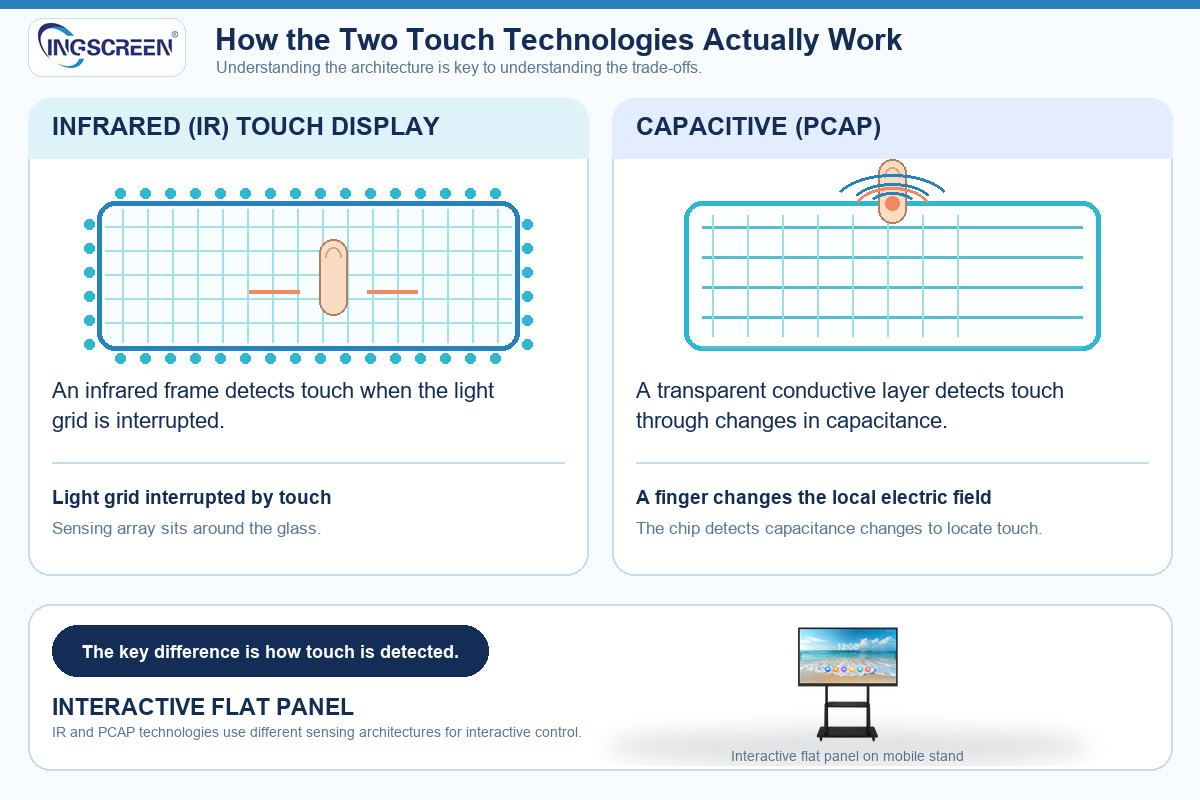
How the Two Touch Technologies Actually Work
Understanding the architecture is key to understanding the trade-offs.
Infrared (IR) Touch Displays
An IR touch display places a frame of infrared emitters and receivers around the glass. When a finger, pen, or any opaque object breaks the light grid, the controller calculates the position. Because the sensing array sits outside the glass, the surface is usually conventional strengthened glass, and almost any object can act as a stylus.
Capacitive (PCAP) Interactive Flat Panels
A capacitive panel uses a transparent conductive layer (typically projected capacitive sensing) integrated directly with the glass. Touch is detected through changes in capacitance. This is why the system responds primarily to fingers and active pens, and why the surface can be smoother, flatter, and more optically uniform—with no frame array interrupting the edge.
The architecture difference is what drives every practical trade-off below.
| Selection factor | Infrared touch | Capacitive touch |
| Writing feel | Pen or finger, wider stylus freedom | Fingers and compatible active pens |
| Optical clarity | Frame array at the edge; glass is bonded or air-gap | Typically cleaner edge-to-edge appearance |
| Surface robustness | Glass faces users directly | Glass with integrated sensing layer |
| Calibration and drift | Occasional recalibration; sensitive to dust or debris on the frame | Generally stable once calibrated |
| Multi-touch and palm rejection | Good multi-touch; palm rejection varies by firmware | Strong multi-touch; usually smoother gesture handling |
| Service model | Frame or sensor components can often be replaced | Sensing layer is part of the glass module |
Why This Decision Matters for Procurement
1. Total Cost of Ownership (TCO), Not Just Unit Price
Unit price is the easiest number to compare but often the least useful. Build your comparison around Total Cost of Ownership:
• Spare Parts: Will you need to stock entire glass modules or just a touch frame?
• Commissioning: How much time is spent on calibration during installation?
• Failure Rates: How do they hold up under real classroom or showroom conditions?
• Service Labor: What is the cost of on-site service in your market?
A slightly higher acquisition cost is often recovered if service calls drop and the spares you hold are cheaper. Generally, IR frames offer lower maintenance costs as components can be replaced individually, whereas PCAP damage often requires full module replacement.
2. Installation Environment
• Infrared: Holds up well in dusty or heavily used environments where users write with any available object. Occasional recalibration is acceptable as part of routine maintenance.
• Capacitive: Suits spaces where users expect a phone-like gesture experience—corporate meeting rooms, design reviews, higher-education collaboration spaces, and premium retail environments.
3. Users and Content
Ask what the panel will actually do.
• If the dominant use is freehand annotation with a pen in a classroom, test that.
• If the dominant use is pinch, zoom, and swipe on maps or BIM models in a boardroom, test that instead.
Hand the same content to the same user on both touch technologies and watch what happens—this single exercise resolves more disputes than any data sheet.
4. Environmental Conditions
Humidity, dust, temperature swings, and cleaning routines all affect touch performance. Cleaning chemicals, abrasive cloths, and condensation are common causes of early touch problems. Confirm with your supplier which cleaning agents are approved and write that into the handover documentation.
How to Run the Comparison as a Procurement Exercise
1. Define the Use Case First: Classroom annotation, boardroom collaboration, wayfinding, or exhibition use have different touch priorities.
2. Build a Scoring Matrix: Weight writing feel, multi-touch capability, glare/optical quality, cleaning compatibility, spares availability, warranty terms, and unit price.
3. Test with Your Own Content: Ask each shortlisted supplier to supply a demo unit with your software and your typical files.
4. Check the Service Story: Ask how long touch modules remain available, how failures are diagnosed remotely, and whether replacement parts ship as glass, frame, or full module.
5. Confirm Customization Implications: If the panel must carry your brand boot logo, default language, pre-installed apps, or kiosk mode, confirm which of these remain available on the touch variant you select.
The INGSCREEN Advantage
The Honest Summary
FAQ
Durability depends more on glass quality, bonding method, and cleaning routine than on the sensing principle alone. However, IR screens are generally more tolerant of surface scratches, while PCAP screens offer a more durable, seamless surface against liquids if properly sealed. Always ask for the glass specification and approved cleaning agents.
Yes, and standardization is usually good for spares and training. However, if some rooms need pen-heavy annotation (classrooms) and others need gesture-driven collaboration (boardrooms), a mixed fleet may be justified. Keep the model families close enough that one spare kit covers most sites.
It can, as firmware and mainboard platforms may differ between variants. INGSCREEN supports custom boot logos, default languages, pre-installed apps, and kiosk modes. Please confirm that your selected touch variant supports the same customization list and firmware track before finalizing your order.

