

 EN
EN
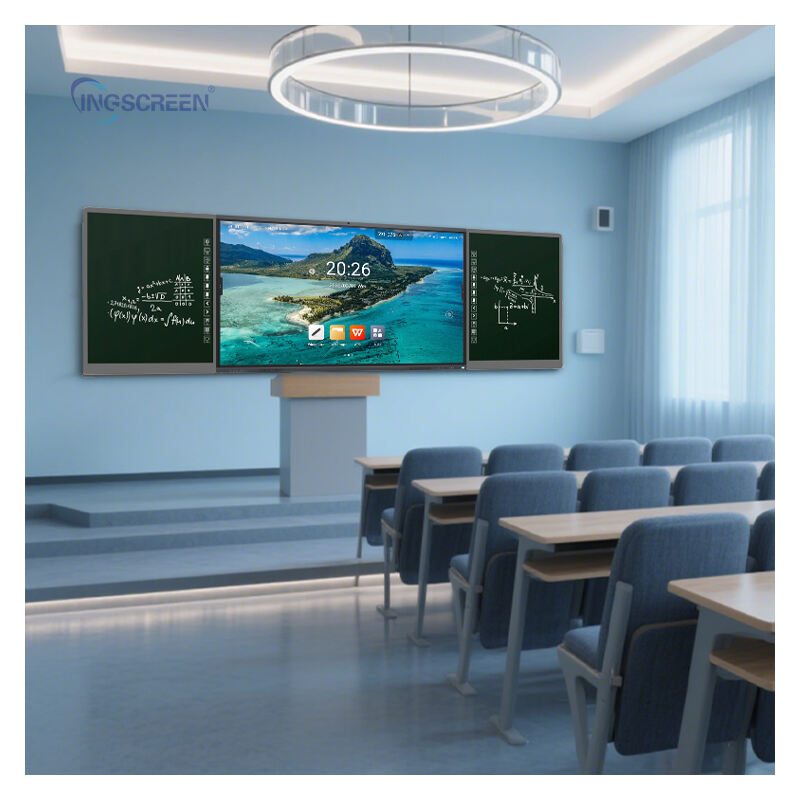
Modern educational environments demand technological solutions that enhance student engagement and streamline teaching processes. Interactive blackboards have revolutionized classroom dynamics by replacing traditional whiteboards with sophisticated digital displays that respond to touch, stylus input, and various multimedia formats. These advanced educational tools create immersive learning experiences that cater to different learning styles while providing educators with powerful presentation and collaboration capabilities. Schools investing in classroom technology must carefully evaluate multiple features to ensure their interactive blackboard selection aligns with educational objectives and technical requirements.
Display Technology and Visual Performance
Screen Resolution and Clarity
High-definition display quality forms the foundation of effective interactive blackboard implementation in educational settings. Modern units should feature minimum 4K resolution to ensure crisp text rendering, detailed image reproduction, and comfortable viewing from various classroom positions. Advanced LED or OLED technology provides superior brightness levels, color accuracy, and contrast ratios that maintain visibility under different lighting conditions. Anti-glare surface treatments reduce reflection issues commonly encountered in brightly lit classrooms, while wide viewing angles ensure students seated at classroom peripheries receive optimal visual experiences.
Screen size considerations depend heavily on classroom dimensions and student capacity. Larger displays ranging from 65 to 86 inches accommodate spacious learning environments, while smaller formats suit intimate classroom settings. The interactive blackboard display should maintain consistent brightness across the entire surface area, preventing hotspots or dim zones that could compromise content visibility during presentations.
Touch Sensitivity and Response Accuracy
Precise touch recognition capabilities distinguish professional-grade interactive blackboards from consumer-level displays. Multi-touch functionality supporting simultaneous inputs from multiple users enables collaborative activities and group problem-solving exercises. Response latency should remain minimal to prevent frustrating delays between touch actions and screen reactions. Capacitive touch technology generally provides superior accuracy compared to infrared alternatives, particularly for detailed drawing, writing, or precise selection tasks.
Palm rejection features prevent accidental inputs when users rest their hands on the display surface while writing or drawing. This functionality proves essential for natural handwriting experiences that closely replicate traditional whiteboard interactions. Advanced models incorporate pressure sensitivity for varied line thickness and artistic applications that engage creative learning activities.
Connectivity and Integration Capabilities
Wireless and Wired Connection Options
Comprehensive connectivity ensures seamless integration with existing school technology infrastructure and various device ecosystems. Wireless capabilities should include dual-band Wi-Fi support, Bluetooth connectivity, and screen mirroring protocols compatible with laptops, tablets, and smartphones. USB ports enable direct connection of storage devices, document cameras, and other peripheral equipment without requiring additional adapters or converters.
HDMI inputs accommodate multiple source devices simultaneously, allowing teachers to switch between presentation materials, video content, and live demonstrations without technical interruptions. Ethernet connectivity provides stable network access for cloud-based applications, software updates, and content synchronization across multiple classroom units. Modern interactive blackboards should support both wireless screen sharing and traditional cable connections to accommodate diverse technical preferences and reliability requirements.
Software Compatibility and Operating System
Native software packages should include comprehensive annotation tools, multimedia playback capabilities, and educational content libraries designed specifically for classroom applications. Cross-platform compatibility ensures the interactive blackboard functions effectively with various operating systems including Windows, macOS, iOS, and Android devices. Cloud integration features enable automatic backup of lesson materials, student work, and presentation files to secure online storage platforms.
Educational app ecosystems provide access to specialized learning software, interactive textbooks, and curriculum-aligned content that enhances traditional teaching methods. Regular software updates should be available to maintain security, add new features, and ensure continued compatibility with evolving educational technology standards.
Durability and Maintenance Considerations
Build Quality and Environmental Resistance
Classroom environments subject interactive blackboards to frequent daily use, potential impacts, and varying environmental conditions. Robust construction featuring reinforced glass surfaces, sturdy mounting systems, and protective bezels ensures long-term reliability under intensive educational use. Dust resistance prevents particle accumulation that could interfere with touch sensitivity or display clarity over extended periods.
Temperature tolerance specifications should accommodate typical classroom climate variations without performance degradation. Anti-bacterial surface coatings contribute to hygiene maintenance, particularly important in shared educational spaces where multiple users interact with the display throughout each day. Vandal-resistant designs protect against intentional damage while maintaining aesthetic appeal suitable for professional educational environments.
Maintenance Requirements and Support Services
Low-maintenance designs minimize disruption to educational schedules while reducing operational costs over the product lifecycle. Self-diagnostic capabilities help identify potential issues before they impact classroom functionality, enabling proactive maintenance scheduling. Easy-access service panels allow technical personnel to perform routine maintenance, software updates, and component replacements without complex disassembly procedures.
Comprehensive warranty coverage should include hardware replacement, technical support, and software updates for reasonable periods reflecting the significant investment schools make in interactive blackboard technology. Local service availability ensures rapid response times when technical issues arise, minimizing classroom downtime that could disrupt learning schedules.
Educational Enhancement Features
Interactive Learning Tools and Applications
Built-in educational software should provide interactive whiteboard functionality, mathematical equation editors, scientific diagram tools, and multimedia annotation capabilities that support diverse subject areas. Virtual laboratory simulations, interactive maps, and 3D modeling applications create engaging learning experiences that transcend traditional textbook limitations. Collaborative tools enable multiple students to work simultaneously on shared projects, fostering teamwork skills and peer-to-peer learning opportunities.
Assessment features allow teachers to create interactive quizzes, polls, and evaluation exercises that provide immediate feedback on student comprehension. Game-based learning applications make educational content more engaging while maintaining curriculum alignment and academic rigor. Recording capabilities enable lesson capture for absent students, review sessions, and professional development purposes.
Accessibility and Inclusive Design
Universal design principles ensure interactive blackboards accommodate students with diverse learning needs and physical abilities. Adjustable height mechanisms or tilting capabilities provide comfortable access for wheelchair users and individuals of varying statures. High-contrast display modes, text size adjustment options, and audio feedback features support students with visual impairments or reading difficulties.
Multi-language support broadens accessibility for diverse student populations, while customizable interface options allow educators to adapt the interactive blackboard experience to specific learning objectives and student requirements. Voice recognition capabilities enable hands-free operation for students with mobility limitations while adding innovative interaction methods for all users.
Cost Considerations and Return on Investment
Initial Investment and Installation Costs
Interactive blackboard pricing varies significantly based on screen size, feature sets, and manufacturer specifications. Schools should evaluate total cost of ownership including mounting hardware, professional installation services, training programs, and extended warranty options. Bulk purchasing agreements often provide substantial cost savings for multi-classroom implementations, while standardizing on single manufacturers simplifies maintenance and support requirements.
Installation complexity impacts overall project costs, particularly when existing classroom infrastructure requires electrical or network upgrades to support advanced interactive blackboard features. Professional calibration ensures optimal performance from initial deployment, while comprehensive training programs maximize educator adoption and student engagement benefits.
Long-term Value and Educational Impact
Successful interactive blackboard implementation demonstrates measurable improvements in student engagement, information retention, and collaborative learning outcomes. Modern units typically provide 7-10 years of reliable service when properly maintained, making the initial investment cost-effective compared to frequent replacement of traditional classroom technology. Energy-efficient designs reduce operational costs while supporting institutional sustainability initiatives.
Professional development opportunities associated with interactive blackboard adoption enhance educator technology skills and teaching methodology innovation. These improvements often translate into broader institutional benefits including improved standardized test scores, increased student satisfaction, and enhanced recruitment capabilities for both students and faculty members.
FAQ
What size interactive blackboard is appropriate for different classroom configurations
Classroom size and seating capacity determine optimal interactive blackboard dimensions. Small classrooms accommodating 15-20 students function well with 65-inch displays, while larger spaces serving 25-35 students benefit from 75-86 inch screens. The viewing distance from the furthest student seat should not exceed 6-8 times the screen height to ensure comfortable text readability and detail recognition. Consider ceiling height limitations and mounting requirements when selecting screen sizes for existing classroom spaces.
How do schools ensure compatibility with existing technology infrastructure
Conduct comprehensive technology audits before interactive blackboard procurement to identify network capacity, wireless coverage, and device compatibility requirements. Ensure selected units support common educational platforms including Google Classroom, Microsoft Teams, and learning management systems already deployed within the institution. Coordinate with IT departments to verify bandwidth capabilities, security protocols, and technical support resources can accommodate new interactive blackboard installations across multiple classrooms.
What training programs help teachers effectively utilize interactive blackboard features
Effective professional development combines hands-on training sessions, online resource libraries, and peer mentoring programs that build educator confidence with interactive blackboard technology. Initial training should cover basic operation, software navigation, and fundamental interactive features, followed by advanced workshops focusing on subject-specific applications and creative lesson planning. Ongoing support through user communities, video tutorials, and technical assistance ensures sustained adoption and innovative usage development throughout the academic year.
How do interactive blackboards support different learning styles and student needs
Interactive blackboards accommodate visual learners through dynamic content presentation, kinesthetic learners via touch-based manipulation, and auditory learners using integrated sound systems and voice feedback features. Collaborative tools enable peer learning opportunities, while individual interaction modes support independent exploration and self-paced learning progression. Accessibility features including text scaling, high contrast modes, and multi-language support ensure inclusive educational experiences for students with diverse abilities and backgrounds.
Table of Contents
- Display Technology and Visual Performance
- Connectivity and Integration Capabilities
- Durability and Maintenance Considerations
- Educational Enhancement Features
- Cost Considerations and Return on Investment
-
FAQ
- What size interactive blackboard is appropriate for different classroom configurations
- How do schools ensure compatibility with existing technology infrastructure
- What training programs help teachers effectively utilize interactive blackboard features
- How do interactive blackboards support different learning styles and student needs

